SOPFlow AI · From know-how to repeatable work

Create SOPs with AI. Put them to work with your team.

Generate a draft, import existing instructions, or capture a browser workflow. SOPFlow AI helps you build the procedure; your team reviews, owns, learns, and runs it.

Explore SOPFlow AI

No card required. AI tools included. Shared weekly usage limits apply.

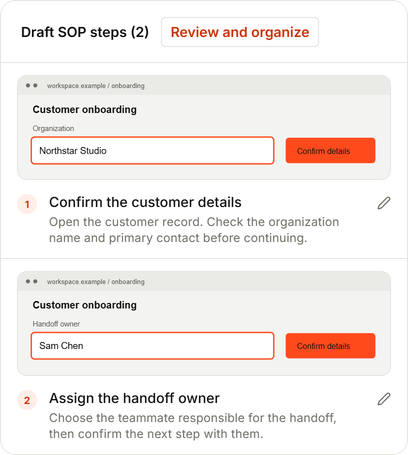
From a browser task to a clear next step

Customer onboarding draft in SOPFlow, with two captured screenshots and instructions ready to review.
SOPFlow interface · Fictional example data

Trusted by teams at

The whole process, connected

One procedure. From first capture to completed work.

Follow one customer handoff through SOPFlow. Choose a stage, try an example action, and see how the same procedure moves the work forward.

Example: Customer onboarding handoff

Do the task. Keep the know-how.

Record a supported browser workflow. Review the captured screenshots and draft instructions, then bring the useful steps into your SOP.

An editable starting point, with the steps in context.

Interactive example · Fictional data
DraftSOP-014

Customer onboarding handoff

Customer SuccessDraft v1.0

  1. 1
    Confirm customer details

    Check the company name and primary contact before continuing.

  2. Assign the handoff owner

    The next browser action will become a draft instruction.

Try capturing the next step. The instructions stay editable.

Built for the work after the document

One place to write it, maintain it, and put it to work.

01 / Create

Stop rebuilding instructions from memory.

Describe the process for an AI draft, structure existing instructions, or capture browser steps. Review the result and add the decisions and exceptions that make it useful.

AI Generate · Import · Review · Recorder

Explore SOPFlow AI

02 / Maintain

Make ownership part of the process.

Connect procedures to teams and roles. Work on a draft, request review, and publish changes while keeping earlier versions available.

Team ownership · Review decisions · Version history

See a reviewed procedure

03 / Use

Help people learn it. Then get it done.

Keep training records and workflow runs connected to the procedure they use. Check learning, assign work, and collect the evidence that explains what happened.

Training records · Checklists · Recurring work

Explore training and runs

Clarity you can check

Know who owns it. Know what was used.

Give your team a shared reference, with controls for the people, versions, and information involved.

A responsible team

Connect procedures to your organization, with roles and team scope determining access.

A version to refer to

Keep review decisions and training records connected to the procedure content they concern.

Sharing you control

Choose which procedures to share through managed links or a help center.

Start with free SOP software

SOPFlow Free includes 3 users, 5 SOPs, PDF export and 50,000 shared AI tokens per week for drafting and recorder processing. $0 per month, with no credit card required.

What you need to get started.

A few practical answers before you create your workspace.

Can I start for free, and what depends on my plan?

Yes. SOPFlow has an ongoing Free plan with no credit card required. It includes AI tools, recorder processing and PDF export within the workspace’s user, SOP, storage and weekly token limits.

See the Free plan and its limits
How do I create my first SOP?

Choose a repeatable task. Write the steps or capture a supported browser workflow with SOP Recorder, then edit the instructions and add the responsible team, checks, and exceptions before review.

Explore the four stages
Can I bring existing instructions?

Yes. Paste existing procedure text into AI document import within your workspace’s AI allowance, then review the phases and steps. Check links, files, and responsibilities separately; this does not migrate another platform’s permissions or history.

Ask about your workflow
What can SOP Recorder capture?

SOP Recorder captures supported browser workflows through a Chrome extension. Native desktop recording is not currently released. Review screenshots and generated instructions before importing or sharing them.

See recorder setup and scope
How do review, training, and runs stay connected?

Review and publish a procedure version, assign training against it, and start runs from an active version. Training records and runs retain their own content references, so later edits do not silently rewrite earlier work.

See the example workflow
Who can access or share our procedures?

Roles, capabilities, and team assignments control workspace access. Administrators can invite teammates within plan limits and manage sharing through links or a help center. Review those settings as your team changes.

Read about access and sharing

One process is a good beginning

Start with the task your team explains most.

Create a workspace. Choose a repeatable task. Build a procedure your team can own, learn, and use.

No card required.