. SOPFlow publishes this comparison using current official Process Street sources and SOPFlow implementation. The pilot is a worksheet to run in your own environment, not a completed competitor benchmark or a customer result. Confirm the proposed products, plan and permissions before buying.
Choose around the work your team must control
Evaluate Process Street when workflow routing, data collection and actions across applications are central. Its Docs product also advertises document approvals and version history, so document control is not exclusive to SOPFlow.
Evaluate SOPFlow when browser capture needs to become a maintained, team-owned procedure that people review, learn and execute. Its run implementation includes required fields, conditional applicability and approval-step sign-off. Compare the exact conditions and permissions your task needs rather than treating either product’s feature name as proof of equivalence.
The important decision can be what happens after work starts: should an active run adopt revised instructions, or retain the reference it began with? Agree that policy before comparing the tools.
Compare the controls with the same task
Scroll horizontally to compare all columns. This table can receive keyboard focus.
| Requirement | Process Street documentation | What to verify in SOPFlow |
|---|---|---|
| Maintain the instructions | Docs describes approval workflows, review cycles, controlled publication and version history. | Assign a maintaining team, review a draft and publish the accepted procedure version. Configure access separately from written responsibilities. |
| Route a recorded condition | Conditional logic can show or hide content, tasks and headings based on rules. | Run fields and recorded prerequisite responses can determine step applicability. Test the exact operators, dependencies and missing-input behavior you need. |
| Hold later work | Stop Tasks prevent later tasks and run completion until the preceding stop is completed. | Required checks, valid required-field evidence and applicable approval prerequisites can block completion. Try an incomplete request instead of checking only the ordinary path. |
| Approve one execution | Approval tasks support approve/reject decisions and resubmission within a workflow run. | A named approval step requires its assigned authorized approver. Test your rejection/rework needs separately; a procedure-version approval and an execution sign-off are different decisions. |
| Change instructions during work | Published workflow changes can be pushed to active runs in a batch or applied to individual runs. | A run snapshots the procedure content it starts with. Editing the source does not rewrite that run. Check the reference in old and newly started runs. |
| Inspect the execution record | The run activity feed records task actions, assignments, approvals and updates to the run. | Inspect field responses, checklist evidence, sign-off and the run’s procedure reference. Confirm export and reader access with the intended plan and roles. |
Compare the proposed package and your actual workload
The official Process Street pricing page showed Startup, Pro and Enterprise with Contact sales on October 15, 2026. We have not obtained a quote. Use a written proposal rather than assuming an older public price still applies. SOPFlow’s current workspace prices and capacities are listed on its pricing page.
Check the current Process Street pricing page
- List the people who author, approve, execute and only read. Ask how each role is counted and which products are included.
- Specify expected runs, automation actions, integrations, API usage and AI use. Confirm allowances, overages, storage, export access and the billing commitment in the proposal.
- Include setup, configuration, migration and ongoing maintenance effort. Compare the supported workflow before comparing a headline rate.
Pilot the same vendor-request workflow in both tools
Use a fictional administrative vendor-record request. This evaluates information collection and routing; it does not authorize a purchase, payment or supplier contract. Choose a maintaining owner, coordinator, named reviewer and reader. Use permitted sample records and keep real account or contact details in their authorized system.
Prepare these three test cases
- VR-204: an existing vendor reference and complete requested outcome. Verify the ordinary path, receiving owner and recorded next action.
- VR-205: a new vendor with a missing contact reference. Check which branch applies, whether required information prevents progress and who resolves the missing item.
- VR-206: a complete request started before a procedure revision. Publish the test change, then inspect the active run, a new run and the recorded version references.
Published instructions
Create a draft, name its owner, review it and publish the version used for the pilot.
A reader finds the current approved instructions and the person who maintains them.
Conditional path
Try the existing-vendor and new-vendor cases, including an unanswered condition.
The expected path is explicit; unresolved input does not silently count as completed work.
Required evidence
Omit the required reference in VR-205 and attempt to continue or finish.
The missing item is visible and the relevant completion check prevents an incomplete result.
Approval and access
Name the approver, attempt later work before sign-off and test an unauthorized user.
Only the configured authorized person can give the required approval, and later work respects the gate. Check any independent-review policy separately.
Rejection and rework
Return one unsigned request for correction, then decide how a correction after approval must be recorded.
The team can identify the rejected or pending work, its owner, resubmission route and retained evidence. Record a gap if the supported correction flow is unsuitable.
Revision during a run
Publish a changed instruction while VR-206 is active, then start another run.
You can explain which revision each run uses and whether updates follow your chosen policy.
Schedule and evidence
Try the required recurring schedule with sample data and inspect a completed run’s evidence.
The expected run, due point, receiver and evidence are visible. Confirm time-zone and export requirements.
Plan and migration fit
Check the proposed products, limits, permissions, sample export and one procedure moved into the destination.
Required capabilities and records are accounted for before moving the library or committing to a plan.
Record the product, plan, configuration, person testing, date, observation and evidence reference for each check. The worksheet starts with both results marked Not tested. Example IDs and acceptance criteria are not claims that either product has passed this pilot.
Download the editable comparison worksheet (CSV)
The walkthrough uses a separate fictional customer-onboarding run. It illustrates SOPFlow execution and evidence, not VR-204/205/206, Process Street’s interface or a completed cross-product benchmark.
See the workflow in SOPFlow
Keep the checks and evidence from each run.
This completed example shows required checks and a recorded handoff note. Use a separate run for each occurrence so the team can review what happened that time.
Watch the recurring-run walkthrough · 0:42
Checks and evidence for one occurrence
0:42 · Captioned walkthrough · No audio
This Friday check has its own run and example account reference. The record belongs to this occurrence.
Edited captures of actual SOPFlow controls with fictional records. Desktop and mobile examples follow the same workflow.
Read the full walkthrough transcript
0:00 · Identify this run
This Friday check has its own run and example account reference. The record belongs to this occurrence.
0:07 · Check the reference
Confirm the account reference. The remaining-check counter shows that the receiving owner still needs confirmation.
0:14 · Confirm the receiver
Confirm the receiving owner after they accept the work. Required checks and evidence serve different purposes.
0:21 · Record the next action
Write the account reference, receiver and next action in the evidence field for this run.
0:28 · Check the saved evidence
Save the response and check the recorded person, time and revision. The run remains in progress in this example.
0:35 · Review the history
Response history preserves the recorded context. Use a separate run for the next occurrence and review exceptions.
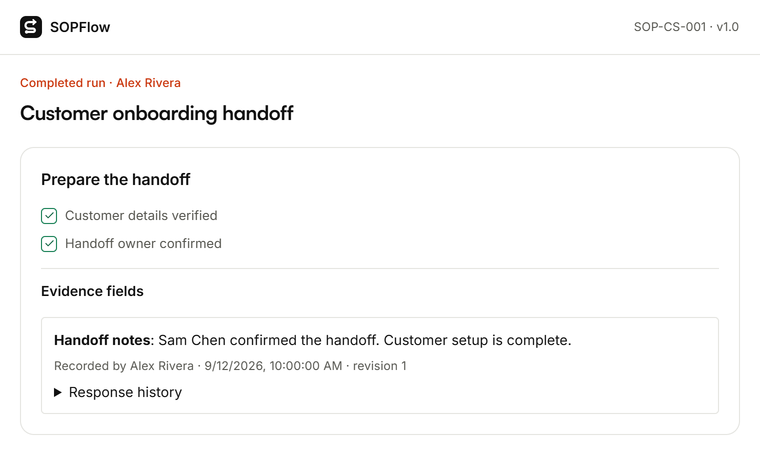

Actual SOPFlow components with prepared fictional records. These examples show the interface, not a customer result.
Move one workflow and preserve its records
Inventory the instructions, conditions, assignments, approval rules, schedules, integrations and records you need. Move one procedure, reconstruct its configuration deliberately and test it with the intended roles before importing more.
Text import is not a transfer of executable rules, account permissions, review history or run evidence. Retain useful source exports under your requirements and check links and attachments in the destination. Do not overwrite old results to make them look as if they used a new version.
In SOPFlow, a signed approval protects the work it covers from ordinary editing; corrected work needs a new run. Verify whether that correction model suits your needs. Do not assume an unsigned rework loop and changing already signed evidence are the same operation.
Questions before choosing a Process Street alternative
- Does SOPFlow replace every Process Street automation?
- No equivalence is claimed. List the triggers, routing, integrations and failure handling your team depends on, then test them individually. A procedure link or a diagram does not prove an external action will execute.
- Is approving a procedure the same as approving a request?
- No. The first accepts reusable instructions; the second records a decision during one execution. Name the required reviewer and evidence for each, and test both where your process needs them.
- Which active-run version policy is better?
- Choose according to the work. Agree when an instruction change must reach work in progress, when the starting reference must be retained and how a correction is authorized and recorded. Verify that policy in the pilot.
- Can the comparison establish compliance or savings?
- It cannot. Your controls, configuration, evidence and review obligations still need assessment. The worksheet records observations; it contains no completed benchmark, customer result or guaranteed cost reduction.