. Written by the SOPFlow editorial team using official Notion documentation and SOPFlow implementation. The examples are original fictional records. No Notion account trial, customer result or feature-parity score is claimed.
Choose the workspace and procedure model you need
Notion combines documents, knowledge, databases and project work in a flexible workspace. Consider it when your team wants to design those connections and maintain its own operating conventions. SOPFlow supplies a procedure model for supported browser capture, maintaining teams, draft/review/publication, training and operational runs. Evaluate the entire task and maintenance effort. A purpose-built procedure tool does not replace every general workspace use case.
Notion already has tools for ownership and recurring work
| Need | Notion documentation | What to inspect |
|---|---|---|
| Find an owner and current knowledge | Wikis support page owners and verification with expiry notifications. | Check the owner, reader access and current instructions; define any additional review policy your process requires. |
| Verify other page types | The help page labels verification outside wikis and in non-wiki databases as Business/Enterprise features. | Confirm the precise page type and current plan. Do not apply a non-wiki restriction to every wiki use. |
| Create another work occurrence | Repeating database templates create entries on a chosen schedule. | Inspect the generated entry, assignment, expected date and completion evidence. Creating an entry does not show that the work happened. |
| Bring in an outline | Text and Markdown import is available on desktop/web. | Review imported content and configure property types, relations, access and recurrence separately. |
Choose a native template or adapt a portable outline
For a template you can add within Notion, browse its free SOP category and review the selected creator's content and requirements. The download on this page is our own text outline. We have not imported it into a Notion account, and it does not install databases or automation.
Browse Notion's free SOP template category
Keep the procedure and each occurrence as separate records
Use a fictional weekly help-link review. The library describes how to perform it; a work log records one occurrence. All references, roles and observations below are teaching examples, not customer results. The review finishes when each reference is classified and every unresolved item has an owner and follow-up; it does not mean all corrections have already been published.
SOP library example
- Procedure
- SOP-07 · Weekly help-link review
- Maintaining owner
- Support lead
- Instruction reference
- Revision A · example published instructions
- Trigger
- The agreed weekly review point
- Scope
- Fictional references FAQ-11, FAQ-12 and FAQ-13
- Completion condition
- Classify all three references and assign each unresolved correction and next check.
- Open the current review instructions and the three permitted sample references. Identify the maintaining owner before proposing a correction.
- Check each reference against its intended source. Record current, correction needed or source unavailable, with the observation.
- Assign each open correction to a named owner with a follow-up point. Route proposed instruction changes through the team's agreed review and publication process.
- Review the occurrence record and open actions together. Record the review outcome without marking unresolved content as corrected.
One fictional work-log record
- Occurrence
- WL-104 · first example weekly review
- Procedure used
- SOP-07 revision A
- Person doing the review
- Reviewer A · fictional role
- Observations
- FAQ-11 current; FAQ-12 title needs correction; FAQ-13 source unavailable.
- Open actions
- Owner B follows up FAQ-12 and Owner C resolves FAQ-13 before the next agreed review.
- Review outcome
- Review complete; two correction actions remain open.
In a Notion setup, choose how library pages, work-log entries and linked actions are represented and connected. Configure the property types and permissions your team needs. In SOPFlow, keep the maintained SOP separate from its operational runs and inspect the particular run's checks and evidence. Neither a page view nor a status label alone demonstrates the underlying work.
A label saying revision A and a link to a live page do not by themselves preserve A's instruction content. Agree how earlier work retains its reference, using the history, archived content or other controls your chosen setup supports. SOPFlow snapshots a run's starting procedure content. Test an instruction change between two occurrences and inspect the old and new records in both products.
Download the SOP library and work-log outline (Markdown)
The file contains this fictional procedure, its work-log example and blank fields to adapt. Use Notion's import flow if you need an editable page; configuring typed properties, relations and recurrence remains separate work. Opening a Markdown file in Notion Desktop can instead show a read-only preview.
Test one procedure before moving the library
- Find the current instructions with the intended reader and identify the maintaining owner. Check actual access separately from a written role label.
- Propose one meaningful change. Have the intended reviewer inspect it and confirm what later readers see. Compare this with the procedure policy your team needs.
- Create a second occurrence after the accepted change. Inspect what the first record retains and whether you can explain the instructions used for each.
- Try the required recurring schedule with sample data. Check the entry or run, receiver, timing and unresolved-action route rather than counting creation as completion.
- Have another permitted reviewer inspect the work log and supporting evidence. Record manual conventions, configuration effort, unsupported requirements and any migration gaps.
These are checks to perform, not results from a completed product trial. Keep private team records in their authorized systems.
The walkthrough is a separate prepared SOPFlow customer-handoff change review. It illustrates review controls, not the help-link example or a Notion interface.
See the workflow in SOPFlow
See the reviewer, decision, and procedure together.
The review panel sits beside the procedure it concerns. This prepared example includes an approval decision and the checks the reviewer verified.
Watch the approval walkthrough · 0:40
Review a change and record approval
0:40 · Captioned walkthrough · No audio
Version 1.1 adds receiving-owner acceptance. Read the change note, instructions and unavailable-owner exception.
Edited captures of actual SOPFlow controls with fictional records. Desktop and mobile examples follow the same workflow.
Read the full walkthrough transcript
0:00 · Understand the change
Version 1.1 adds receiving-owner acceptance. Read the change note, instructions and unavailable-owner exception.
0:08 · Check the approval policy
The policy names the reviewer and requires approval independent of the submitter. The decision is still pending.
0:16 · Inspect the review snapshot
Content identity records the reviewed content. Its scope explains what the snapshot includes and what it does not verify.
0:24 · Explain the decision
Add a review note describing the acceptance check and the exception that were verified.
0:32 · Record the approval
Record approval and review the named decision. Approval and publication are separate steps; publication is not shown here.
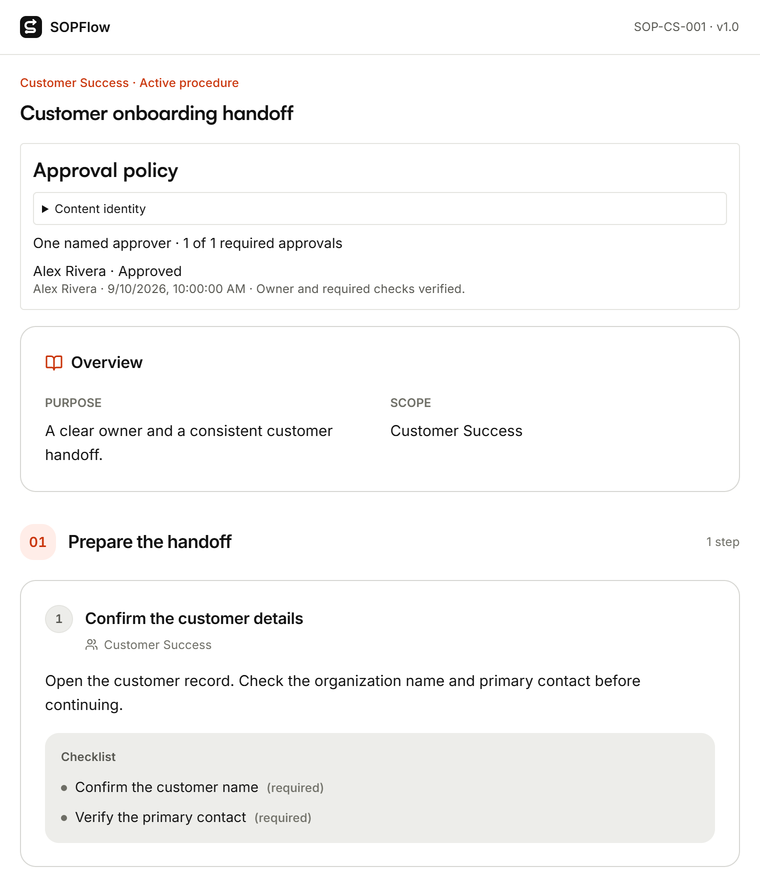

Actual SOPFlow components with prepared fictional records. These examples show the interface, not a customer result.
Compare the actual package and migration work
Confirm the plan and page types needed for verification, history, sharing, automation and AI use. Include setup, ongoing maintenance and any integrations. If you already keep general work in Notion, compare the incremental procedure requirement rather than assuming you will remove the whole workspace. Use each vendor's current prices and a written proposal where needed.
Move one permitted example and verify structure, links, attachments, owners and reader access. A text copy does not transfer edit history, verification decisions or task records. Keep the source reference until the responsible team accepts the replacement, and define which system owns later changes if both remain.