Reviewed . Based on SOPFlow implementation and the vendor sources linked below. Features and plan availability can change.
What Confluence does well
Confluence offers collaborative pages, comments, whiteboards, databases, Loom content, and connections with Jira. Its native page approvals are documented on Premium and Enterprise. Check the plan, content type and space settings needed by your team.
See the official Confluence product information
When SOPFlow fits your workflow
Evaluate SOPFlow when the primary unit is a maintained procedure. Browser capture feeds editable steps, ownership is visible on the org chart, and published SOPs connect with training and individual runs. Compare those outcomes with the Confluence configuration you already use.
Compare the same work, not just the feature list
Compare the work you need to complete. Vendor capabilities below come from the linked official product information; evaluation questions are checks to perform in your own pilot.
| Task | What to evaluate in the alternative | What to verify in SOPFlow |
|---|---|---|
| Knowledge collaboration | Confluence provides collaborative pages and spaces, templates and connections to Atlassian work. | SOPFlow centers the workflow on procedure ownership, review, learning and repeated execution. |
| History and access | Confluence Cloud documents native page approvals on Premium and Enterprise, with recorded decisions and activity history. Check the supported content type, space settings and required edit permission. | SOPFlow maintains procedure versions and review decisions. Team ownership and access permissions are separate controls. |
| Evidence of execution | Define whether a Confluence page is reference material or whether another workflow/app records each completed task. | Use runs for individual work records and training records for learning. Evaluate exports and integrations with a sample. |
Product sources
See the complete handoff and download the SOPSee our internal test and original outputConfluence SOP template: a worked supplier-request example
If you want a native Confluence starting point, use Atlassian’s official SOP template. The original outline below shows how one administrative procedure can fit into a page. Adapt its headings and roles to your editor and process; the download is a portable Markdown draft, not an installed Confluence template or an integration.
Open Atlassian’s official SOP template
Fictional example OPS-014, revision 1. It prepares a complete supplier request for a designated reviewer. Purchase authorization and payment follow separate organizational rules. No request has been submitted or approved through either product for this example.
Scroll horizontally to read the complete example. The table region can receive keyboard focus.
| Template field | Filled-in example |
|---|---|
| Outcome | The receiving coordinator accepts a complete request and records the next action. |
| Start and prerequisites | A teammate needs a supplier item. Prepare the item description, quantity, needed-by date, business reason, approved contact and supporting record links. |
| Maintaining owner | Operations lead maintains these instructions. The requester supplies missing details; the receiving coordinator checks completeness. Editing and approval permissions are configured separately. |
| Working steps | 1. Requester checks the required information. 2. Add links to authorized supporting records. 3. Resolve missing or ambiguous details. 4. Receiver accepts responsibility for the next review action. 5. Save the request reference, procedure revision and acceptance. |
| Exception | If the contact or required information is missing, leave the request open and return it to the requester with a named follow-up owner. |
| Completion evidence | Request ID, receiver, next action, unresolved items, acceptance time and procedure revision. Store sensitive records in the authorized system. |
| Maintenance trigger | Review when the request form, responsible roles or decision rules change, and at the interval chosen by the owner. |
Completed fictional record: SR-042 had no contact at first. The requester supplied the approved contact; the coordinator accepted the completeness review and recorded the next action. The work record refers to OPS-014 revision 1. Approval of these instructions and acceptance of this request are separate decisions.
Download the editable SOP page outline (Markdown)
Confluence SOP approvals: check the native workflow
Confluence Cloud documents native approvals for pages on Premium and Enterprise. They do not apply to live docs or blog posts. The documented workflow supports approval requests, responses and an activity log; do not assume a third-party approval app is always required.
Space admins can enable statuses with approvals, select required approvers and require approval before publishing new pages. Check the current plan and actual space settings. For revisions to an already published procedure, test the behavior your policy needs instead of assuming a new-page rule covers every change.
A status label is useful context. For formal signoff, inspect the approval request and its recorded decision. Atlassian documents separate status behavior in view and edit modes, so check what readers and authors actually see.
Read Atlassian’s native approval documentation
Evaluate the procedure, its approval and one execution
Use OPS-014 in both environments. First prepare the instructions, then test a normal request and one missing-contact case. This is a pilot plan for your team, not a completed competitor benchmark.
- Find the instructions: a teammate should reach the intended page or published SOP from the normal team entry point. Confirm the owner and procedure reference are visible.
- Review a change: rename one field in a draft. Ask the authorized reviewer to identify the change and record the decision. In Confluence, inspect the native approval settings and activity log available on the selected plan.
- Check reader access: verify that the intended teammate can read the approved instructions and that the editing/approval rules match your policy. A written role name does not grant permission.
- Perform the work: create a fictional supplier request and have the receiver accept its next action. Choose where each completed request is recorded; approval of the reference page alone is not that request’s execution record.
- Try the exception: remove the contact, confirm that the request remains open, and record who must resolve it. Change the instructions if the next action is unclear.
- Revisit the revision: confirm what later readers see and retain the reference used by earlier work. In SOPFlow, inspect the separate review, training and run records needed for your workflow.
Confluence is a good candidate when the procedure belongs beside existing Atlassian knowledge and project work, with the required approval setup available. Evaluate SOPFlow when you want procedure ownership, learning assignments and individual runs organized around the SOP. Compare the actual configuration and remaining manual work in each.
The product walkthrough below uses the existing fictional customer-onboarding procedure to show review in SOPFlow. It is a separate example from the supplier-request outline OPS-014.
See the workflow in SOPFlow
See the reviewer, decision, and procedure together.
The review panel sits beside the procedure it concerns. This prepared example includes an approval decision and the checks the reviewer verified.
Watch the approval walkthrough · 0:40
Review a change and record approval
0:40 · Captioned walkthrough · No audio
Version 1.1 adds receiving-owner acceptance. Read the change note, instructions and unavailable-owner exception.
Edited captures of actual SOPFlow controls with fictional records. Desktop and mobile examples follow the same workflow.
Read the full walkthrough transcript
0:00 · Understand the change
Version 1.1 adds receiving-owner acceptance. Read the change note, instructions and unavailable-owner exception.
0:08 · Check the approval policy
The policy names the reviewer and requires approval independent of the submitter. The decision is still pending.
0:16 · Inspect the review snapshot
Content identity records the reviewed content. Its scope explains what the snapshot includes and what it does not verify.
0:24 · Explain the decision
Add a review note describing the acceptance check and the exception that were verified.
0:32 · Record the approval
Record approval and review the named decision. Approval and publication are separate steps; publication is not shown here.
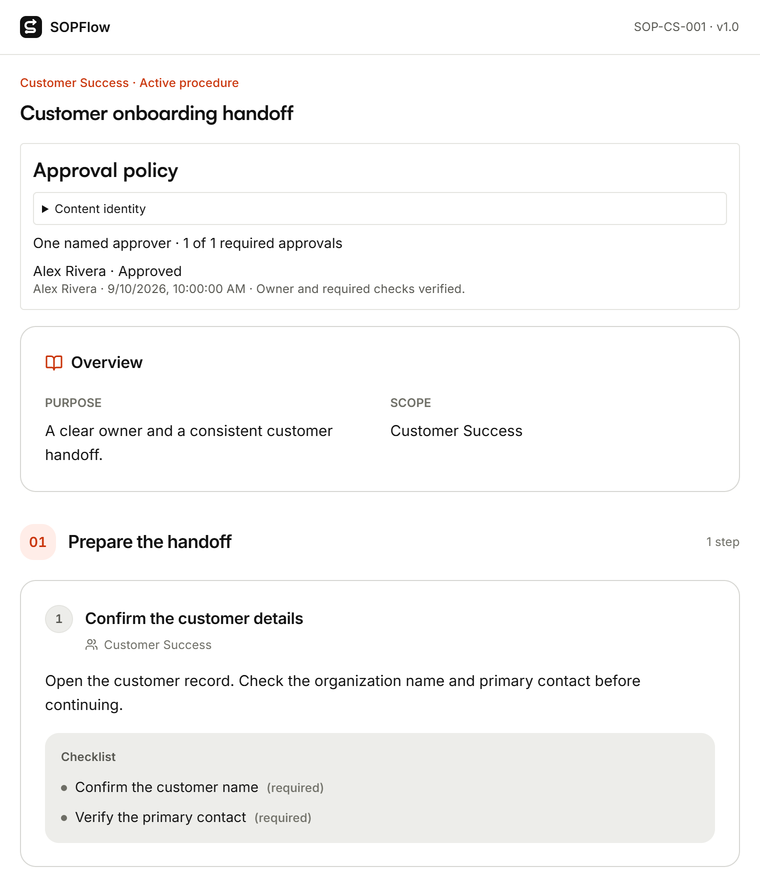

Actual SOPFlow components with prepared fictional records. These examples show the interface, not a customer result.
Related procedure guidance
What to weigh before switching
Confluence’s ecosystem can support additional workflows through integrations and apps. Compare the configuration you actually use, including marketplace features. SOPFlow does not replace every Jira-linked knowledge and project workflow.
Try a useful side-by-side pilot
Take a frequently revised procedure from a Confluence space. Test how readers find the active instructions and how reviewers handle a change. In SOPFlow, connect the procedure to its owner and run the task to evaluate the operational benefit.
Bring over one current procedure by pasting its text into document import, or capture the browser workflow again. Check formatting, links, attachments, permissions, and approval history separately; importing content does not migrate another platform’s complete history.
Before you move your team
- Can a teammate find the right procedure and complete the task without the author guiding every step?
- Can the owner review a change and trace which version a training assignment or run used?
- Do the plan limits, capture coverage, access controls, and remaining manual steps fit your requirements?
Browse all software comparisons
Plan features, AI processing allowances, storage, and user limits apply. Check the current plan comparison.