Give recurring work a check and a record
Connect each repeated check to a procedure, a responsible person and its own run evidence. Keep exceptions visible and review what happened each time.
See the workflow in SOPFlow
Keep the checks and evidence from each run.
This completed example shows required checks and a recorded handoff note. Use a separate run for each occurrence so the team can review what happened that time.
Watch the recurring-run walkthrough · 0:42
Checks and evidence for one occurrence
0:42 · Captioned walkthrough · No audio
This Friday check has its own run and example account reference. The record belongs to this occurrence.
Edited captures of actual SOPFlow controls with fictional records. Desktop and mobile examples follow the same workflow.
Read the full walkthrough transcript
0:00 · Identify this run
This Friday check has its own run and example account reference. The record belongs to this occurrence.
0:07 · Check the reference
Confirm the account reference. The remaining-check counter shows that the receiving owner still needs confirmation.
0:14 · Confirm the receiver
Confirm the receiving owner after they accept the work. Required checks and evidence serve different purposes.
0:21 · Record the next action
Write the account reference, receiver and next action in the evidence field for this run.
0:28 · Check the saved evidence
Save the response and check the recorded person, time and revision. The run remains in progress in this example.
0:35 · Review the history
Response history preserves the recorded context. Use a separate run for the next occurrence and review exceptions.
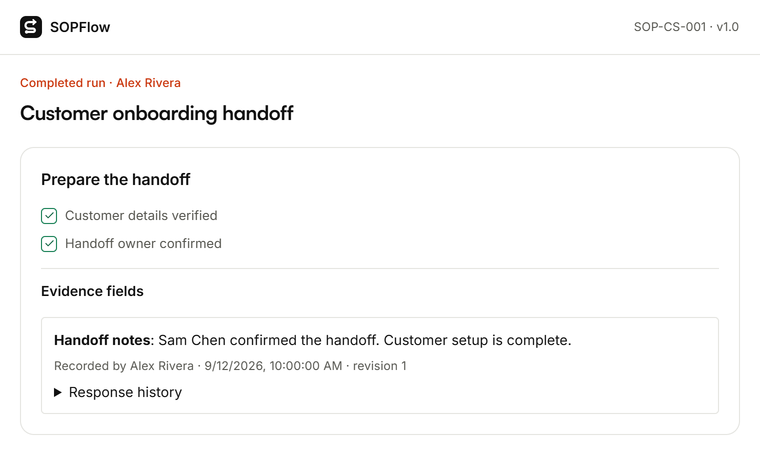

Actual SOPFlow components with prepared fictional records. These examples show the interface, not a customer result.
1. Define one repeatable check
Choose the task, responsible team, prerequisites and exceptions. Review the procedure before using it for repeated work.
2. Assign the work and its timing
Create a run from the active procedure and assign a person. For recurring work, confirm plan availability, timezone, frequency and who handles a missed occurrence.
3. Complete checks and record evidence
Follow required checks and save the reference, observation or handoff note. Escalate exceptions to the named owner before marking work complete.
4. Review each occurrence
Review evidence from each run. Use unresolved actions and repeated questions to improve the procedure while preserving previous records.
An example to try
Example: each Friday, operations reviews an open customer handoff. The owner checks the account reference and receiving teammate, records the next action, and escalates a missing contact. Try this with fictional records before scheduling the real process.
Completed customer handoff example
Free downloads. Edit the Word file in Word or import it into Google Docs.
What to verify before choosing
Recurring work, execution features and storage depend on your plan. Confirm permissions, schedule settings and the checks your organization requires. A checklist record does not automatically prove that a physical task was performed.
Try one repeatable check
Use a fictional Friday handoff to test the checks, receiver and next action. Confirm recurrence and plan settings before scheduling real work.
Create a free workspace