Sources checked October 15, 2026. Written by the SOPFlow editorial team. This vendor-authored comparison uses public documentation and SOPFlow implementation; no hands-on Trainual benchmark or customer outcome is claimed.
Choose by the work your team needs to do
Consider Trainual when your priority is an organized employee-training program and you want to evaluate its learning and reporting experience. Consider SOPFlow when a small team wants to pilot browser capture, an owned procedure and recurring work with transparent workspace capacity. Both document processes and support learning. The right choice depends on the exact package, workflow and limits you test.
What Trainual already offers
Trainual advertises training, quizzes, screen recording and flowcharts; Pro adds org and accountability charts. Its recorder supports screen, camera or both. These overlap with several SOPFlow needs. Capture-to-step parity, specialist learning requirements and operational run behavior need a hands-on check.
What to evaluate in SOPFlow
SOPFlow Recorder captures supported browser interactions and screenshots for draft instructions you review and import. Connect a procedure to its maintaining team, use a draft and review before publication, and inspect the procedure context retained by training or a run. Test each part your team needs; this does not establish that SOPFlow matches every learning-management feature.
Compare the actual subscription and commitment
SOPFlow prices below are per workspace in USD, not per user. Annual totals are the annual charge rather than twelve times a discounted-looking monthly label. Use the plan comparison for the complete current allowances.
| SOPFlow plan | Monthly charge | Annual charge | Included users | SOP capacity |
|---|---|---|---|---|
| Free | 0 USD | 0 USD | 3 | 5 |
| Starter | 39 USD | 390 USD | 10 | 25 |
| Pro | 149 USD | 1,490 USD | 50 | 250 |
| Enterprise | Custom quote | Custom quote | Unlimited | Unlimited |
Free is ongoing with no card. Starter covers a workspace of up to ten users; it is not an unlimited-seat plan. API access starts on Pro. Enterprise is quoted separately. Taxes, purchasing terms and any additional requirements need confirmation before purchase.
Trainual's main page offers a demo and lists a 1,000 USD implementation fee. Its alternate pricing page showed Training starting at 5 USD per user/month, billed annually, with a 3,000 USD minimum annual commitment on October 15, 2026. This is a published display, not our quote. Confirm the package, total, seat rules, implementation and add-ons in writing.
Compare the first-year total and renewal separately. Record who needs creator, manager and learner access; count everyone who needs a seat. Ask whether unused seats, expansion during the year and cancellation change the total. A lower displayed rate is not a lower verified cost until the configurations and commitments match.
Trainual main pricing and implementation FAQTrainual alternate pricing display
Capture, ownership, training and execution
Use these as evaluation questions. Vendor descriptions show what to investigate; the table is not a tested feature-parity score or an independent ranking.
| Decision | Trainual check | SOPFlow check |
|---|---|---|
| Capture the task | Test the advertised recording experience and whether the output supports the instructions your learner needs. | Record one supported browser task; check events, images, draft instructions and editing effort. Native desktop recording and uploaded-video conversion are outside the released Recorder scope. |
| Maintain responsibility | Inspect which chart, role and content ownership tools are included in the proposed package. | Attach the SOP to its maintaining team and verify actual permissions separately; a written role or org-chart node does not grant access. |
| Control an update | Check review behavior, content verification and the plan's history retention. | Edit a new draft, verify reviewer eligibility, publish the approved version and trace the change notes. Inspect old records before assuming they use the latest version. |
| Train a teammate | Test assignments, a decision-focused quiz and the manager's completion view. | Evaluate SOP-based training and sign-offs against your needs; confirm entitlements before assuming Free includes every product workflow. |
| Repeat the operational task | Ask for a demonstration of the exact task, exception and evidence workflow you need. | Use a published procedure for an operational run and check responses and evidence. The authoring board and a quiz completion are different records. |
Content verification and training completion answer different questions
An instruction can be current while a learner still needs practice. A training record can be complete while the procedure has since changed. Decide what each status means before comparing dashboards. These are documented Trainual behaviors to inspect in your proposed configuration, not completed test results.
| Event | Trainual documentation | Question for your evaluation |
|---|---|---|
| Owner verifies content | Reminders ask the subject owner to review and reverify its accuracy. | Who maintains the instructions, and what separately demonstrates a learner's readiness? |
| Share published changes | Choose whether completion scores are kept or reset, and when people are notified. | Define who needs the update and inspect signed-record constraints before changing completion settings. |
| Completion expires | The reset interval follows each person's initial completion date. | Test the intended refresher cadence separately from a particular procedure revision. |
| Restore step content | Restoring content leaves completion scores unchanged; notification is separate. | After restoration, identify the instructions learners see and what their earlier result actually covers. |
In SOPFlow, a training assignment pins a procedure snapshot and version, and the attempt retains its learning context. Publishing a new revision does not relabel the earlier attempt. Decide whether the change needs another assignment or an explanation, then inspect the old and new records. A separate operational run records an occurrence of the work; its evidence and a training completion serve different purposes.
Confirm current history retention in the proposed package. The version-history help page still uses older Trainual+ terminology, while the current pricing matrix uses Core, Pro, Premium and Enterprise. Do not treat those names as interchangeable plan entitlements.
Add one controlled change to the onboarding pilot
Use fictional procedure TRN-HO-07 and permitted sample records. Revision A names the handoff receiver; revision B adds explicit receipt before closure. Prepare one learner who finished A and another who will start B. Agree which people should revisit the changed instruction, then observe the outcome. The exercise evaluates the system and configuration, not real employee performance.
- Ordinary case: the fictional receiver is available and records receipt of the next action.
- Exception case: receipt is missing. The learner identifies the open item, the resolving owner and the next check instead of recording an accepted handoff.
Record the baseline
Record the package, configuration, procedure reference and completed-A learner state before making a change.
Can you identify the content and result that existed before the update?
Review and publish the change
Create revision B, have the intended reviewer inspect the receipt instruction and make the accepted instructions available.
Can an authorized reader find the intended current instruction and its maintaining owner?
Choose the learning update policy
Decide who must revisit the change. In a permitted test setup, inspect notification, completion and signature options before applying an update.
Does the observed result match the chosen policy, with existing evidence accounted for? Do not notify unrelated real users.
Inspect both learning records
Compare the earlier learner's result with a learner starting after the update. Record the content reference, status and any new assignment.
Can you explain which instructions each learner used, without assuming an unchanged score proves knowledge of B?
Observe the work
Use the ordinary and missing-receipt cases. Have a reviewer inspect the actual handoff record and discuss unresolved questions.
Does the practice evidence show the required decision? Record the scope of the review separately from the training score.
Keep evidence and record gaps
Inspect the required report or export, retained references, reader access and quoted package limits.
Can another permitted reviewer interpret the earlier result and later change? Record unsupported requirements and manual follow-up.
The editable record begins with both products marked Not tested for every check. It contains no claimed pass, ranking, customer result or time saving. Keep account details, employee records and evidence files in their authorized systems.
Download the training-change evaluation record (Markdown)
The walkthrough uses a separate prepared customer-handoff training example. It shows SOPFlow's assignment and retained result, not the TRN-HO-07 experiment, a Trainual screen or a completed comparison trial.
See the workflow in SOPFlow
An assigned procedure. A training record to review.
This customer success example shows assigned learning and a completed attempt against SOP-CS-001. A manager still reviews the learner’s practical handoff before deciding readiness.
Watch the onboarding walkthrough · 0:42
From assigned SOP to training record
0:42 · Captioned walkthrough · No audio
Open the assigned procedure. The version reference tells the learner which instructions this assignment covers.
Edited captures of actual SOPFlow controls with fictional records. Desktop and mobile examples follow the same workflow.
Read the full walkthrough transcript
0:00 · Find the assignment
Open the assigned procedure. The version reference tells the learner which instructions this assignment covers.
0:07 · Read the procedure
Review the current instructions and the exception: keep the handoff open when the receiving owner is unavailable.
0:14 · Check the decision
The quiz checks a practical decision from the procedure, including what to do when the ordinary path cannot continue.
0:21 · Answer and acknowledge
Select the appropriate action and acknowledge that you have read and understood this assigned version.
0:28 · Review the result
Submit the answers and review the recorded quiz result. A passing score is one input to readiness.
0:35 · Keep the context
The retained attempt shows the procedure version and result. A manager still checks practical readiness for the role.
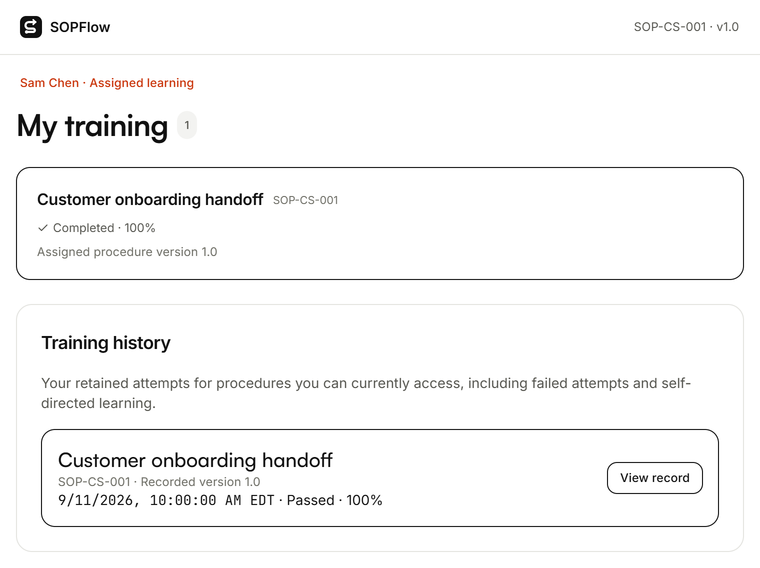

Actual SOPFlow components with prepared fictional records. These examples show the interface, not a customer result.
Run the same small pilot in both systems
Use a fictional customer handoff rather than an entire library. Sales must supply a contact and agreed scope; a receiving owner must accept a next action and due date. Prepare the same ordinary case, missing-contact case and unavailable-owner case for both evaluations. Label untested fields as untested.
- Write down the expected finish condition, process owner and access prerequisites before trying either tool.
- Observe whether a teammate can find the instructions, understand a decision and identify where to stop. Record unclear wording and the corrections required.
- Change the receiving role and one screen label. Check who reviews the update, what a reader sees and how earlier learning or work records retain their context.
- Compare the resulting record and maintenance effort. Keep the actual plan and total cost beside the findings; no illustrative screenshot establishes time saved.
Move one procedure before moving the library
Paste the current instructions into SOPFlow's text importer or capture the supported browser task again. Review structure, links, attachments, responsibilities and access after import. A text import does not migrate another platform's users, permissions, approval trail or complete training history. Keep the original reference available until the responsible team verifies the replacement.
Questions to resolve before choosing
Ask the owner of your evaluation which course formats, integrations, retention rules, approval behavior and exports are required. A vendor's documented capability is a starting point; confirm the actual tier and behavior. If structured learning is the central problem, evaluate Trainual's training experience carefully. If maintaining a small procedure library and repeating the work is central, test the full SOPFlow path before expanding.
- SOPFlow plan details
- Start with a three-person Free pilot
- See the supported Recorder workflow
- Evaluate SOP-based onboarding