An operations manual, or company playbook, connects the procedures a team needs with the people who maintain them. Start with one service workflow, make the current instructions easy to find and test whether another teammate can use them. This guide includes an original administrative example and free editable Markdown resources.
What is an operations manual?
An operations manual is a maintained collection of instructions and references for the work of a business or team. It explains which procedure to use, who owns it, where its approved version lives and how to raise a problem. A small company can begin with a short index and a few linked procedures rather than one long document.
Keep the purpose of each document clear. A policy sets a rule; an SOP describes a repeatable task; a work instruction explains a detailed step. The manual connects those items. A completed task record shows what happened on one occasion and belongs with the work, rather than being written back into the reusable instructions.
A training manual can explain how someone learns a role. An operations manual also needs to help an experienced teammate carry out current work. Link the learning path to the relevant procedures and check practical readiness separately.
Build a structure people can navigate
Use the following outline as a starting structure. Choose the detail your team needs; these headings are an editorial template, not a mandatory standard. Give each maintained procedure a stable reference so a renamed department does not break the route to its instructions.
- Cover and scope: manual title, maintaining role, revision, review decision, intended readers and work included.
- How to use it: the current home, how to find a task, where to ask a question and what to do if instructions conflict.
- Roles and access: the maintaining owner, performing roles, reviewer and escalation route. Configure system permissions separately.
- Procedure index: reference, title, responsible team, current revision and link to the maintained instructions.
- Procedure pages: outcome, trigger, prerequisites, steps, decisions, exceptions and completion evidence.
- Maintenance and records: change requests, review triggers, publication decisions and links to the place where individual task records are kept.
Give each procedure a maintenance owner
Name a role that can resolve an inaccurate step and a backup for absences. The person doing the work may differ from the person maintaining its instructions. At a handoff, name the receiving role and the check that completes the transfer.
In a small team, one person may hold several roles. Write down which responsibility they are acting in and whether your organization requires a separate reviewer. A responsibility in the manual does not grant permission to read, edit or approve in the chosen system. Test those permissions with the intended users.
Keep shared rules in their maintained home and link to them. A copied policy in five procedures becomes five places to correct. If a team needs a local variant, identify its owner and explain how it relates to the common procedure.
Example: a small service team’s first manual
Faro Studio is a fictional five-person service business. Its first manual covers incoming administrative requests, their weekly follow-up and changes to the instructions. The roles, IDs and completed results are teaching examples, not customer records or an approved manual for your business.
- Manual reference
- M-OPS-001 · example revision 1 · maintained by the Operations lead.
- Scope
- From receipt of a routine service request to an acknowledged owner and next action. Quoting, payments and emergency response follow separate procedures.
- Working roles
- Request coordinator records the request; Delivery lead accepts the next action; Operations lead maintains the instructions and resolves ownership gaps.
- Current home and records
- A maintained manual index links to OPS-101, OPS-102 and DOC-101. Individual request records stay in the team’s approved work system.
OPS-101: register and assign a service request
Example revision 1. Begin when a routine request arrives through the team’s approved channel. The coordinator needs the request reference, a permitted contact reference, the requested outcome and a Delivery lead who can receive it.
- Coordinator: open the source request, confirm its reference and check the requested outcome. Link to the authorized source rather than copying private contact details into the manual.
- Coordinator: create or update the work record with its reference, requested outcome and relevant constraint. If information is missing, use the exception path before routing it as ready.
- Coordinator: propose the Delivery lead as receiver and record the next action and agreed due point. Link to OPS-101 revision 1 in this example record.
- Delivery lead: open the source, check that the task is within scope and acknowledge ownership of the next action. Ask the coordinator to resolve unclear information.
- Coordinator: confirm the acknowledgment is visible. Mark intake complete only when the receiver and next action are recorded; otherwise keep the request pending.
If information or a receiver is missing
Leave the request pending, name who must supply the missing item and ask the Operations lead to resolve an unassigned request. Do not mark it accepted merely because a message was sent.
Completed fictional record
REQ-018 · requested outcome: schedule a routine service review · source: demo request reference · receiver: Delivery lead · next action: propose a review slot · due: next agreed business day · acknowledgment: recorded · status: intake complete under OPS-101 revision 1.
OPS-102 closes the loop: at the example team’s weekly review, the Delivery lead checks open requests, records the next action for each and gives unassigned items to the Operations lead. A new review record retains the queue references and unresolved items. The editable example includes this procedure and DOC-101 in full.
Test the manual with one real workflow
Before moving the entire shared drive, choose one procedure and one teammate who did not write it. Use approved sample data and agree what a successful result looks like. The following pilot produces actionable observations without assuming that a page view proves understanding.
- Find it: ask the teammate to locate the current request-intake procedure from the manual index. Record the time and any wrong destination; set your own acceptable target before testing.
- Follow it: complete an ordinary sample request and inspect its assigned owner, next action and acknowledgment.
- Try an exception: remove the requested outcome from a second sample. Check that the teammate leaves it pending and routes the question to the correct role.
- Maintain it: report an unclear field, have the owner review the correction and check that a reader can identify the new current revision.
Plan for changes before launch
Set a review cadence that fits how often the work changes and bring the review forward when a tool, role, rule or repeated question changes the task. The manual index needs its own maintenance owner, while each procedure can have a different review date. Updating the index does not mean every procedure has been reviewed.
For example, a new mandatory request field triggers DOC-101 in the sample manual. The coordinator reports the affected step. The owner edits a draft, a reviewer tests an ordinary request and a missing-information case, and an authorized publisher releases the accepted revision. The index then points to that revision and the owner decides who needs updated training.
Keep the previous execution record associated with the instructions it used. Record what changed and why; do not rewrite an earlier result to imply that it used the latest revision. Decide retention and access under your own requirements.
Expand after the first team uses it
Use the pilot notes to fix missing prerequisites, unclear decisions and broken links before adding another department. Review repeated questions, unresolved handoffs and the effort needed to keep the content current. Compare like-for-like tasks over time; the fictional example in this guide is not evidence of a productivity improvement.
Inventory existing files with their title, owner, last review, destination and a decision to retain, combine or retire. Reconcile conflicting instructions with the owner before archiving a copy. Text import does not carry another platform’s complete permissions, review history or execution records.
In SOPFlow, maintained procedures connect with team ownership, review, training and runs. Use training to support learning and a run to follow and record one execution. Verify the workflow and access your team needs before expanding the library.
The product walkthrough below uses a separate fictional customer-onboarding procedure. It shows review and publication in SOPFlow; it is not footage of Faro Studio, an execution of this sample manual or a customer result.
See the workflow in SOPFlow
See the reviewer, decision, and procedure together.
The review panel sits beside the procedure it concerns. This prepared example includes an approval decision and the checks the reviewer verified.
Watch the approval walkthrough · 0:40
Review a change and record approval
0:40 · Captioned walkthrough · No audio
Version 1.1 adds receiving-owner acceptance. Read the change note, instructions and unavailable-owner exception.
Edited captures of actual SOPFlow controls with fictional records. Desktop and mobile examples follow the same workflow.
Read the full walkthrough transcript
0:00 · Understand the change
Version 1.1 adds receiving-owner acceptance. Read the change note, instructions and unavailable-owner exception.
0:08 · Check the approval policy
The policy names the reviewer and requires approval independent of the submitter. The decision is still pending.
0:16 · Inspect the review snapshot
Content identity records the reviewed content. Its scope explains what the snapshot includes and what it does not verify.
0:24 · Explain the decision
Add a review note describing the acceptance check and the exception that were verified.
0:32 · Record the approval
Record approval and review the named decision. Approval and publication are separate steps; publication is not shown here.
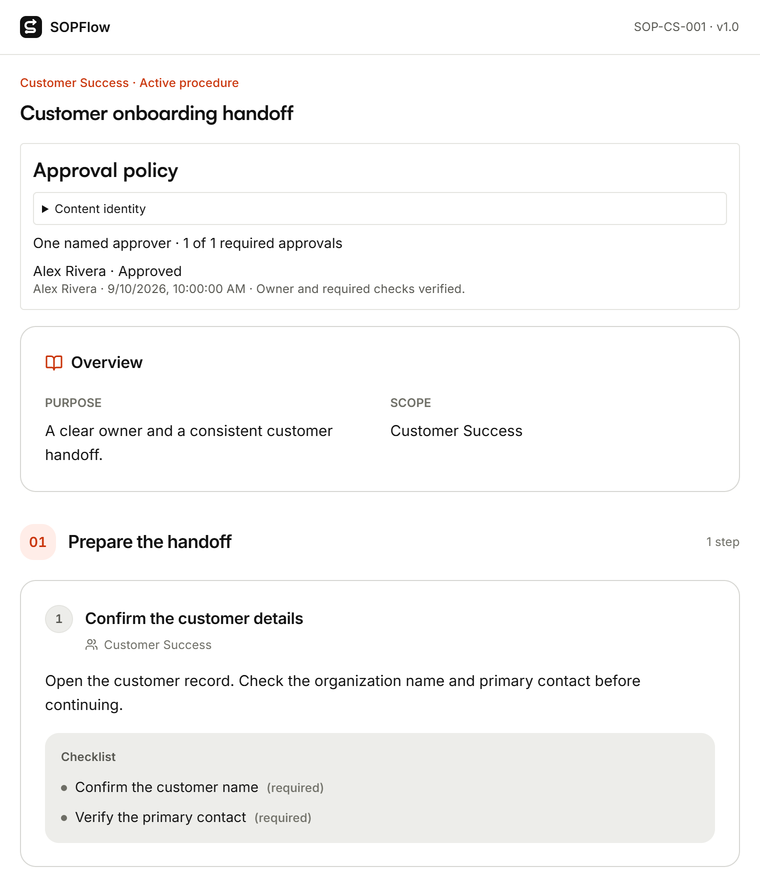

Actual SOPFlow components with prepared fictional records. These examples show the interface, not a customer result.
Download the editable manual template and example
Choose the blank structure to build your own manual, or the filled-in example to inspect how its index, three administrative procedures and sample records fit together. Both are free Markdown files you can edit in a text editor or copy into your chosen documentation tool. No sign-in is required.
Replace the sample roles, links, timing, access rules and acceptance checks. Ask the people doing the work to test the draft, resolve exceptions and obtain the required review before publication. Downloading a template does not establish approval or transfer another platform’s history and permissions.
Sample manual index for Faro Studio
This fictional M-OPS-001 revision 1 index connects the three procedures in the editable example. The maintaining role checks instructions; the individual work records retain their own results and procedure references.
| Section | Owner | Procedure and record |
|---|---|---|
| Request intake | Operations lead | OPS-101 revision 1: accepted receiver and next action; sample request REQ-018. |
| Open-request review | Delivery lead | OPS-102 revision 1: a new review record, including unresolved items; sample WR-006. |
| Instruction changes | Operations lead | DOC-101 revision 1: recorded review decision; sample CR-003 returns a draft for correction. |
Before using the example
- Inventory the current files: title, owner, last review, destination and decision to retain, merge or retire.
- Move one process first. Preserve useful history and redirect links; do not silently discard unresolved instructions.
- Ask the receiving team to find and follow the procedure before migrating the next section.
Continue with a related task
Want to know why we built SOPFlow? Read the founder’s story.